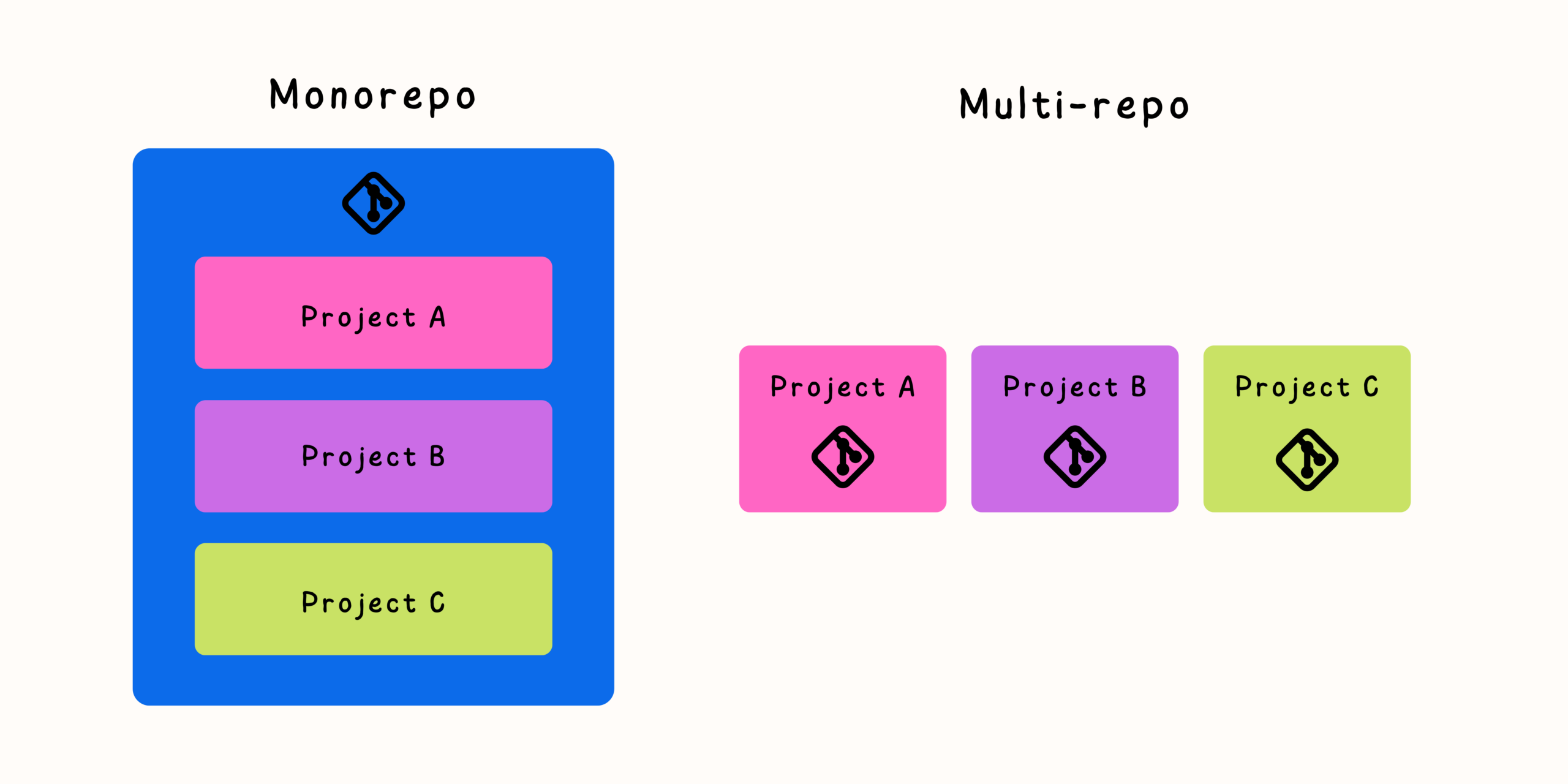

Git submodules have existed for many years as a way to manage dependencies between Git repositories. They provide a mechanism for embedding one repository inside another while keeping the two codebases separate. At first glance, this seems like an elegant solution: teams can reuse shared components, maintain independent version histories, and avoid copying code between projects.
However, as projects grow and teams become larger, Git submodules often introduce complexity that outweighs their benefits. Many development teams discover that submodules require additional workflows, extra commands, and careful coordination to avoid synchronization problems.
Understanding how Git submodules work, where they create friction, and what alternatives exist is essential for choosing the right repository strategy for modern software development.
What Are Git Submodules?
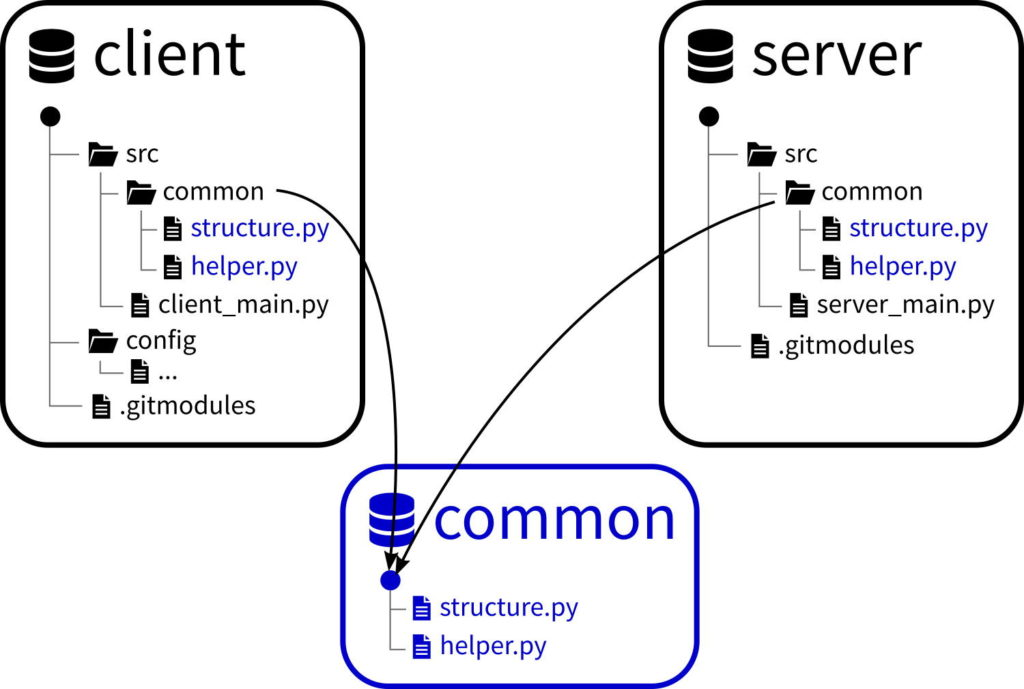
A Git submodule is a reference from one Git repository to another repository at a specific commit.
Instead of storing another project’s files directly, the main repository stores:
- The URL of the external repository
- The exact commit reference to use
- Configuration information describing the relationship
For example, a company may have:
- A main application repository
- A shared authentication library repository
- A common UI component repository
The application repository can include the shared projects as submodules while keeping each repository independent.
How Git Submodules Work
When developers clone a repository containing submodules, Git does not automatically download the nested repositories.
The typical workflow requires additional commands:
git clone <repository-url>
git submodule update --init --recursive
Updating a submodule also requires explicit actions:
cd submodule-directory
git pull
cd ..
git add submodule-directory
git commit
The parent repository records the new submodule commit reference.
This extra layer of management is where many teams begin experiencing challenges.
Why Teams Start Using Git Submodules
Git submodules solve several legitimate problems.
Common reasons teams introduce them include:
Sharing Common Code
Multiple projects may depend on the same component:
- Internal libraries
- Shared configuration
- Development tools
- Documentation repositories
- Infrastructure scripts
Submodules allow teams to reuse these resources without duplicating code.
Maintaining Independent Release Cycles
Sometimes a shared component needs its own development timeline.
A separate repository allows:
- Independent versioning
- Separate permissions
- Dedicated maintainers
- Different release schedules
Keeping Repository Boundaries Clear
Some organizations prefer strict separation between projects.
Submodules allow teams to maintain ownership boundaries while still connecting related codebases.
The problem is not that submodules are useless. The issue is that their operational complexity increases quickly.
Common Problems With Git Submodules
Problem 1: Developers Forget to Initialize Submodules
One of the most common issues occurs when a developer clones a repository and the submodule directories appear empty.
A developer may see:
project/
 ├── application/
 └── shared-library/
but the shared library contains no files.
The reason is simple: the submodule was not initialized.
New team members often encounter this problem because cloning a repository is no longer a single-step process.
Problem 2: Updating Code Requires Multiple Commits
In a normal Git workflow, developers modify files and commit changes.
With submodules, the process becomes more complicated.
A change inside a submodule requires:
- Commit changes inside the submodule repository.
- Push those changes.
- Update the parent repository’s submodule reference.
- Commit the updated reference.
Missing any step can create confusion.
Problem 3: Detached HEAD States
When Git checks out a submodule, it usually places it at a specific commit rather than a branch.
Developers may see:
HEAD detached at abc1234
This surprises many users because they expect to be working on a normal branch.
If someone edits code without creating a branch, their work can become difficult to manage.
Problem 4: Difficult Dependency Updates
A shared library update sounds simple:
“Update the application to use the latest version.”
With submodules, someone must manually update the reference.
Teams need processes for:
- Tracking available updates
- Reviewing changes
- Testing compatibility
- Updating references consistently
Without discipline, different projects can run different versions of the same dependency.
Problem 5: CI/CD Complexity
Continuous integration systems often require special handling for submodules.
Build pipelines need to:
- Fetch nested repositories
- Authenticate against multiple Git sources
- Handle recursive dependencies
- Cache additional repositories
A missing configuration option can break builds unexpectedly.
Hidden Costs of Git Submodules
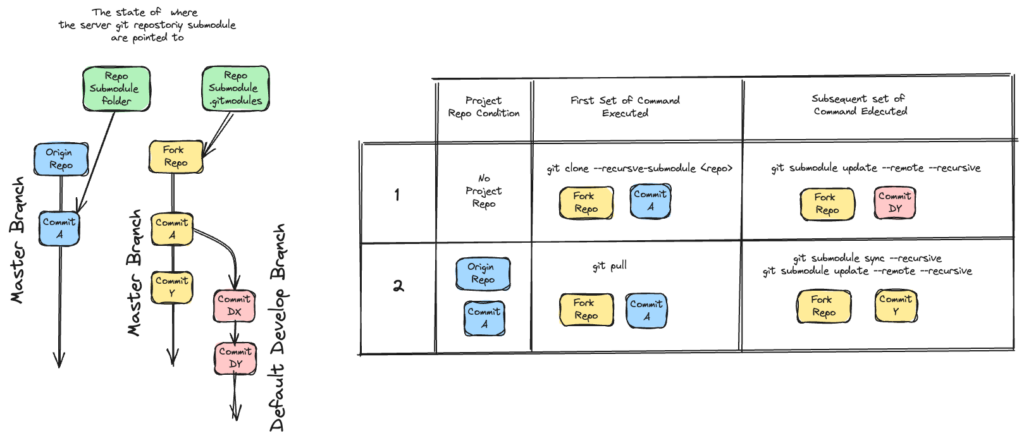
The biggest issue with submodules is not a single technical limitation. It is the ongoing maintenance cost.
Increased Developer Cognitive Load
Developers must remember:
- When to update submodules
- How to commit changes correctly
- How to synchronize repositories
- How to troubleshoot missing code
Every additional workflow rule increases the chance of mistakes.
More Difficult Onboarding
New developers already need to understand:
- The codebase
- The build system
- The development environment
Submodules add another concept they must learn before becoming productive.
More Complicated Collaboration
Teams need clear agreements about:
- Who owns each repository
- When updates happen
- How releases are coordinated
- How changes are reviewed
Without strong processes, submodules become a source of friction.
Reduced Visibility
When code is spread across repositories, understanding the complete system becomes harder.
Developers may need to jump between:
- Multiple repositories
- Different branches
- Separate issue trackers
- Different release histories
This slows down development, especially in large teams.
Better Alternatives to Git Submodules
For many modern teams, other approaches provide better developer experiences.
Alternative 1: Monorepositories
A monorepo stores multiple projects, services, and shared libraries inside a single repository.
Example structure:
company-platform/
 ├── apps/
 │    ├── web/
 │    └── mobile/
 ├── packages/
 │    ├── ui-library/
 │    └── shared-utils/
 ├── services/
 │    ├── api/
 │    └── worker/
 └── tools/
Advantages include:
- One source of truth
- Easier code sharing
- Atomic commits across projects
- Simplified dependency management
- Easier refactoring
Many large engineering organizations use monorepo approaches because they reduce coordination overhead.
Alternative 2: Package Managers
Instead of linking repositories directly, teams can publish shared code as packages.
Examples:
- JavaScript packages through npm
- Python packages through PyPI
- Java libraries through Maven
- .NET packages through NuGet
Benefits:
- Clear versioning
- Dependency management
- Automated updates
- Independent releases
This approach works well when shared components have stable APIs.
Alternative 3: Git Subtree
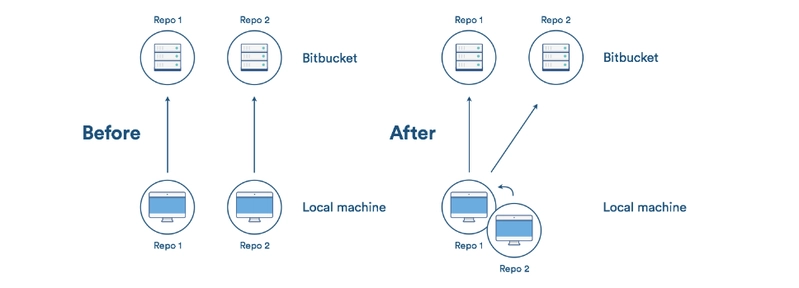
Git subtree allows one repository to include another repository’s content while keeping the files directly available.
Unlike submodules:
- Files exist inside the main repository.
- Developers do not need additional initialization steps.
- Builds are simpler.
Subtrees can be useful when teams need shared code but want a single checkout experience.
Alternative 4: Repository Synchronization Tools
Some teams maintain separate repositories but synchronize changes automatically.
Common approaches include:
- Automated mirroring
- Scheduled synchronization jobs
- CI-based publishing
- Dependency update bots
This keeps repository boundaries while reducing manual maintenance.
When Git Submodules Still Make Sense
Despite their challenges, submodules are not always the wrong choice.
They can work well when:
- A dependency changes rarely.
- Repository ownership must remain separate.
- External projects are involved.
- Exact version control is important.
- Teams understand the workflow.
Examples include:
- Embedded software projects
- Vendor code
- Third-party integrations
- Large external dependencies
The key is understanding the trade-offs before adopting them.
Choosing the Right Repository Strategy
The best approach depends on team structure, project complexity, and development goals.
Consider these questions:
How Often Does Shared Code Change?
Frequent changes usually favor:
- Monorepositories
- Package-based workflows
Rarely changing dependencies may work well with submodules.
How Large Is the Team?
Small teams can often manage submodules successfully.
Large teams usually benefit from simpler workflows.
Do Projects Need Independent Releases?
Independent products may require separate repositories.
Highly connected systems often work better in a monorepo.
How Important Is Developer Experience?
If fast onboarding and simple workflows are priorities, minimizing repository complexity is usually beneficial.
Final Thoughts
Git submodules solve a specific problem: connecting independent repositories while preserving separate histories. However, they introduce additional complexity that can become expensive as teams and codebases grow.
Many organizations eventually move away from submodules toward approaches such as monorepositories, package-based dependency management, Git subtree workflows, or automated synchronization systems.
The right choice depends on your team’s needs, but the general trend in modern software development is clear: reducing unnecessary repository friction leads to faster collaboration, easier maintenance, and better developer productivity.
Git submodules are still a useful tool—but they should be adopted deliberately, with a clear understanding of the long-term workflow costs they introduce.
Related Posts