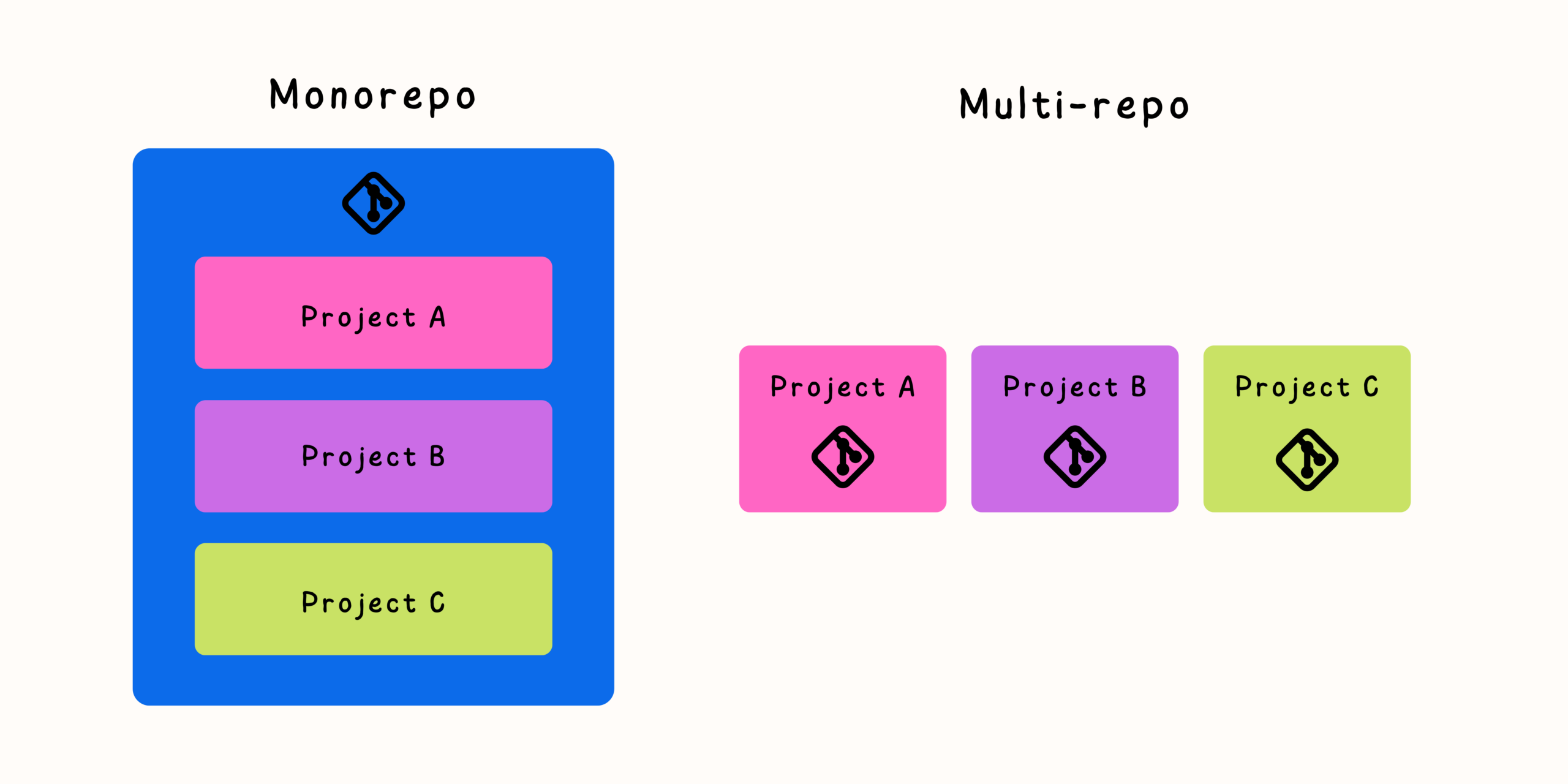

Many software teams begin with a simple repository structure. A project starts with one Git repository, a few developers commit code, and everything works smoothly. As the organization grows, new services, applications, libraries, and tools are created. Soon, the original repository becomes a collection of smaller repositories managed by different teams.
At first, this multi-repository approach seems like a natural solution. Each project gets its own Git history, release cycle, and ownership model. However, as the number of repositories increases, hidden complexity begins to appear.
Managing dozens or hundreds of repositories introduces challenges around dependencies, synchronization, releases, developer workflows, and team collaboration. Without the right processes, the flexibility of multiple repositories can become a source of delays and technical overhead.
Understanding these challenges is the first step toward building a more efficient development environment.
Why Teams Move Toward Multiple Git Repositories
A multi-repository architecture provides several advantages, especially for organizations with independent teams.
Common reasons teams adopt multiple repositories include:
- Separate ownership between teams
- Independent deployment cycles
- Different technology stacks
- Easier permission management
- Smaller repository sizes
- Clear project boundaries
For example, a company might maintain separate repositories for:
- Frontend applications
- Backend services
- Mobile applications
- Infrastructure code
- Shared libraries
- Internal tools
This structure appears organized, but complexity grows as connections between repositories increase.
The Hidden Costs of Multiple Repositories
The biggest challenge with multi-repos is not managing individual repositories. Git handles that well.
The real difficulty comes from managing relationships between repositories.
Dependency Management Becomes More Difficult
When projects depend on each other, every repository becomes part of a larger ecosystem.
Consider a simple change:
- A shared authentication library needs an update.
- The backend service depends on that library.
- The frontend application depends on the backend API.
- Documentation needs updates.
In a multi-repository environment, this change requires coordination across multiple locations.
Teams must manage:
- Dependency versions
- Compatibility
- Release timing
- Update communication
- Testing across repositories
As dependencies increase, coordination becomes increasingly complex.
Repository Synchronization Challenges

One of the biggest problems with multiple repositories is keeping related code synchronized.
A single feature may require changes across:
- API repository
- Frontend repository
- Shared library repository
- Deployment repository
- Documentation repository
Without proper synchronization practices, teams can experience:
- Broken builds
- Incompatible versions
- Missing updates
- Duplicate work
- Delayed releases
Developers often spend more time coordinating changes than writing code.
The Problem of Shared Libraries
Shared libraries are one of the most common reasons teams struggle with multi-repositories.
A typical workflow looks like this:
- A team updates a shared library.
- A new version is published.
- Other projects update their dependencies.
- Testing reveals compatibility issues.
- Multiple teams coordinate fixes.
This process works at a small scale but becomes difficult when many teams depend on the same components.
Common problems include:
- Old dependency versions remaining in production
- Breaking changes affecting multiple teams
- Unclear ownership of shared code
- Slow adoption of improvements
Duplicate Configuration Across Repositories
Multiple repositories often create repeated infrastructure.
Teams may maintain separate copies of:
- CI/CD workflows
- Build scripts
- Linting rules
- Security configurations
- Development documentation
- Environment setup files
Over time, these configurations begin to drift.
One repository may use:
- Updated dependencies
- Better security practices
- Improved automation
while another remains outdated.
Maintaining consistency becomes a continuous effort.
The Developer Experience Problem
Developers working in multi-repo environments often face unnecessary friction.
A typical task might require:
- Finding the correct repository.
- Cloning multiple projects.
- Checking dependency versions.
- Setting up several environments.
- Understanding relationships between systems.
For experienced developers, this may be manageable. For new team members, it can create a steep learning curve.
A fragmented codebase often leads to fragmented understanding.
Challenges in Large-Scale Refactoring
Refactoring is easier when related code exists together.
In a multi-repository system, a simple change can become a coordination project.
For example:
A team wants to rename a shared API field.
The process may involve:
- Updating the backend repository.
- Publishing a new API version.
- Updating frontend clients.
- Updating mobile applications.
- Updating documentation.
- Coordinating deployment timing.
Large changes require careful planning and communication.
CI/CD Complexity in Multi-Repository Environments
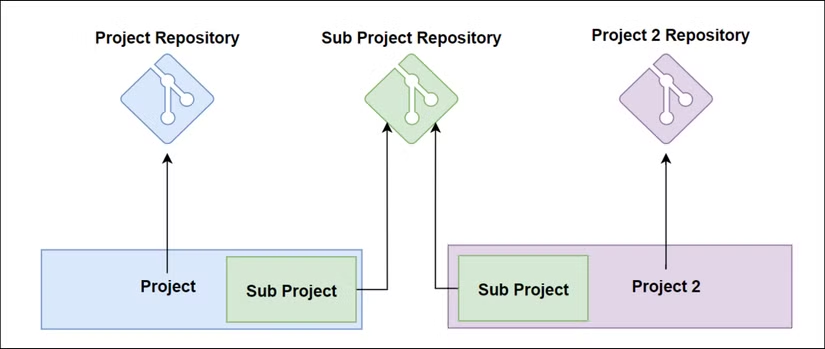
Continuous integration becomes more complicated as repository count grows.
Teams must manage:
- Multiple pipelines
- Different deployment workflows
- Cross-repository testing
- Dependency triggers
- Release coordination
A change in one repository may require testing another repository.
Without automation, teams rely heavily on manual coordination.
Managing Multiple Repositories Effectively
Multi-repositories are not inherently bad. Many successful engineering organizations use them effectively.
The key is creating strong management practices.
Establish Clear Ownership
Every repository should have clearly defined ownership.
Teams should know:
- Who maintains the code
- Who reviews changes
- Who approves releases
- Who handles incidents
Clear ownership prevents abandoned repositories and unclear responsibilities.
Use Automated Dependency Management
Manual dependency updates do not scale well.
Teams can use automation to:
- Detect outdated dependencies
- Create update proposals
- Run compatibility checks
- Notify responsible teams
Automated dependency management reduces maintenance work.
Standardize Development Practices
Consistency reduces unnecessary complexity.
Organizations should standardize:
- Repository structure
- Branching strategies
- Pull request workflows
- Code review rules
- CI/CD templates
- Documentation requirements
Developers should not need to relearn processes for every repository.
Create Shared Tooling
Instead of copying configuration everywhere, create reusable tooling.
Examples include:
- Shared CI templates
- Development environment templates
- Common scripts
- Internal developer platforms
Centralized tools reduce duplication while maintaining repository independence.
Improve Repository Discovery
As repository counts grow, finding information becomes harder.
Useful practices include:
- Maintaining a repository catalog
- Documenting ownership
- Providing architecture diagrams
- Creating internal documentation portals
Developers should quickly understand where code lives and how systems connect.
Automate Cross-Repository Workflows
Manual synchronization does not scale.
Automation can help with:
- Triggering dependent builds
- Testing related projects
- Publishing packages
- Updating documentation
- Coordinating releases
The goal is to reduce human coordination overhead.
Consider When a Monorepo Makes Sense
Sometimes the complexity of multiple repositories becomes a signal that a different approach may work better.
A monorepo can simplify situations where:
- Projects change together frequently
- Shared code is common
- Teams need visibility across systems
- Coordinated releases are frequent
Benefits include:
- Atomic changes
- Easier refactoring
- Centralized dependency management
- Simpler onboarding
However, monorepos require their own tooling and organizational practices.
Hybrid Repository Strategies
Many organizations find success with hybrid approaches.
Examples include:
Monorepo for Internal Applications
Keep tightly connected applications and shared libraries together.
Separate Repositories for External Projects
Maintain independent repositories for public packages or products.
Package-Based Sharing
Move stable components into versioned packages instead of direct repository dependencies.
The best strategy depends on how teams collaborate.
Practical Checklist for Managing Multiple Git Repositories
A healthy multi-repo environment usually includes:
- Clear repository ownership
- Automated dependency updates
- Standardized workflows
- Central documentation
- Consistent CI/CD practices
- Automated testing between dependencies
- Versioning policies
- Release coordination processes
These practices reduce friction as the organization grows.
Final Thoughts
Multiple Git repositories provide flexibility and independence, but they also introduce hidden coordination costs. The challenge is not creating repositories—it is managing the relationships between them.
As systems become larger, teams must invest in automation, documentation, ownership models, and development standards to keep complexity under control.
For some organizations, multi-repositories remain the right choice. For others, the growing overhead becomes a reason to explore monorepositories or hybrid approaches.
The most effective engineering teams are not defined by how many repositories they have. They are defined by how efficiently developers can understand, change, test, and deliver software across the entire system.

Related Posts